
Last updated on
Nov 6, 2026

DD 2912 2006-2026 free printable template
pdfFiller is not affiliated with any government organization

Fill out
Complete the form online in a simple drag-and-drop editor.

eSign
Add your legally binding signature or send the form for signing.

Share
Share the form via a link, letting anyone fill it out from any device.

Export
Download, print, email, or move the form to your cloud storage.
Why pdfFiller is the best tool for your documents and forms


End-to-end document management
From editing and signing to collaboration and tracking, pdfFiller has everything you need to get your documents done quickly and efficiently.
Accessible from anywhere
pdfFiller is fully cloud-based. This means you can edit, sign, and share documents from anywhere using your computer, smartphone, or tablet.
Secure and compliant
pdfFiller lets you securely manage documents following global laws like ESIGN, CCPA, and GDPR. It's also HIPAA and SOC 2 compliant.
What is DD 2912
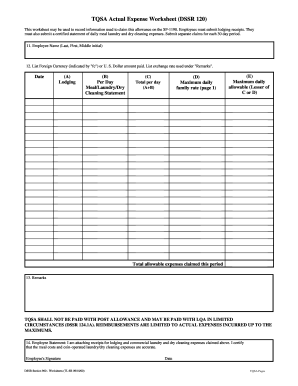
The Claim for Temporary Quarters Subsistence Expense (TQSE) is a government form used by DoD employees to request reimbursement for costs incurred while in temporary quarters during a PCS move.
pdfFiller scores top ratings on review platforms




The customer service Rep was awesome and helped me with everything I needed!
good
ITS AWESOME
So far I have been pleased , I will better be able to answer this after I finish with this project.
This is helping me resolve and out of date will w/o paying a lawyer again.
Very useful
Who needs DD 2912?
Explore how professionals across industries use pdfFiller.

DD 2912 is needed by:
-
Department of Defense employees relocating permanently
-
Military personnel undergoing a Permanent Change of Station
-
Civilian employees associated with DoD travel
-
Travel coordinators managing military relocations
-
Finance officers processing travel claims
Comprehensive Guide to DD 2912
Overview of the Claim for Temporary Quarters Subsistence Expense (TQSE)
The Claim for Temporary Quarters Subsistence Expense (TQSE) form, also known as DD Form 2912, is an essential document for Department of Defense (DoD) travelers. It serves to facilitate the reimbursement of temporary quarters expenses incurred during a permanent change of station (PCS). This claim is particularly significant as it provides financial support to service members and their families during relocation.
Purpose and Benefits of the TQSE Form
The TQSE form is crucial for Department of Defense travelers who must document their temporary quarters expenses effectively. By using this form, individuals can access several benefits, including financial assistance that alleviates the burden of relocation costs. Specifically, it covers expenses related to lodging, meals, and other necessities incurred while transitioning to a new duty station.
Who Should Use the Claim for Temporary Quarters Subsistence Expense (TQSE)
This form is specifically tailored for DoD employees, including military personnel. It is applicable in various scenarios where service members or their families require financial assistance during their move. Understanding the proper use of the TQSE form can ensure that eligible claimants receive the support they need during their transition.
Eligibility Criteria for TQSE Submission
To be eligible for submitting a TQSE claim, individuals must meet specific conditions. These criteria include:
-
Employment status with the Department of Defense
-
Type of transfer being initiated
-
Documentation that substantiates temporary quarters usage
Ensuring that all eligibility criteria are met is crucial for a successful claim submission.
How to Fill Out the TQSE Form Online
Filling out the TQSE form online is straightforward. Follow these steps to ensure accuracy:
-
Access the TQSE form via pdfFiller.
-
Enter your details in the designated fields like 'EMPLOYEE NAME' and 'EMPLOYEE SIGNATURE.'
-
Review all entries to ensure correct information is provided.
-
Complete any additional sections required by your specific claim circumstances.
-
Save and submit the filled form as per submission guidelines.
Common Mistakes and How to Avoid Them
When completing the TQSE form, it is essential to avoid common errors that can lead to claim denials. Frequent mistakes include incomplete information, incorrect signatures, and failing to attach necessary documentation. To enhance accuracy, consider using a review and validation checklist before submission. Thorough validation ensures that all details are correct and increases the chances of claim approval.
Submission Methods and Important Details
Submitting the completed TQSE form can be done through multiple channels. Key considerations include:
-
Where to physically submit the form or upload online
-
Deadlines for submission to avoid delays
-
Potential processing times and any applicable fees
It is critical to follow all specified guidelines for timely submission.
Security and Compliance When Using the TQSE Form
Security is paramount when handling sensitive documents like the TQSE form. pdfFiller implements robust data protection measures, including 256-bit encryption, to safeguard user information. Compliance with the Privacy Act and relevant regulations ensures that personal data is processed safely and remains confidential throughout the submission process.
Post-Submission: What to Expect After Filing the TQSE Form
After submitting the TQSE form, claimants can expect a confirmation of receipt. Tracking the status of the claim is recommended to stay updated. In case of rejection, understanding the common reasons can help in making necessary corrections and resubmitting the claim accurately.
Maximize Your Experience with pdfFiller
Utilizing pdfFiller for filling out the TQSE form enhances your experience through its user-friendly interface and efficient eSigning capabilities. Key features that support users include the ability to edit, annotate, and share documents seamlessly, making the form completion process quick and efficient.
How to fill out the DD 2912
-
1.Access and open the Claim for Temporary Quarters Subsistence Expense form (DD Form 2912) by visiting pdfFiller and searching for the form by its name or form number.
-
2.Once you have opened the form, use the editing tools provided by pdfFiller to fill in each required field, which includes personal information like your name and social security number.
-
3.Prepare your necessary documentation in advance. You will need information like lodging receipts, meal expenses, and any other relevant costs related to your temporary quarters.
-
4.As you complete the form, carefully follow the instructions provided on the document to ensure that all necessary details are included and correct.
-
5.Review the entire form thoroughly once all fields are completed to ensure accuracy and completeness, checking for any potential errors or missing information.
-
6.After confirming the details of your claim, save your filled-out form directly on pdfFiller. You can easily download a copy or submit it electronically through the platform.
-
7.If submitting through pdfFiller, follow the prompts for electronic submission. Alternatively, download the form to print and mail it or submit as your organization's guidelines specify.

Who is eligible to use the TQSE form?
Eligibility to use the TQSE form generally includes Department of Defense employees and military personnel who are relocating and have incurred expenses related to temporary quarters during a PCS move.
What is the deadline for submitting the TQSE form?
Although specific deadlines may vary based on DoD guidelines, it's important to submit the TQSE form as soon as possible after incurring eligible expenses. Check with your finance office for precise deadlines.
How can I submit the TQSE form?
You can submit the TQSE form electronically through pdfFiller, or print and mail it according to your organization's policies for submission of government forms. Ensure that all required signatures are included.
What supporting documents are needed with the TQSE form?
When submitting the TQSE form, you will need to provide supporting documents such as lodging receipts, meal bills, and any applicable laundry expenses to validate your claim for reimbursement.
What are common mistakes to avoid when filling out the TQSE form?
Common mistakes include failing to provide complete information, not signing the form, or omitting necessary supporting documentation. Review the form for any required fields before submission.
How long does it take to process the TQSE form?
Processing times for the TQSE form can vary depending on the responding office's workload and procedures. Generally, expect processing to take a few weeks, so submit your form promptly.
Are there any fees associated with submitting the TQSE form?
There are typically no fees to submit the TQSE form through government channels. However, check with your finance office to confirm if any specific fees apply to your situation.
Related Forms




Related Catalogs
Get the latest insights from our blog


If you believe that this page should be taken down, please follow our DMCA take down process
here
.
This form may include fields for payment information. Data entered in these fields is not covered by PCI DSS compliance.